

AI made coding faster, but your releases didn’t speed up, because every feature still goes through manual testing. I help teams replace that with acceptance tests that run automatically in your pipeline. I have a few spots left for 2027. Book a call.
One of the biggest challenges with practicing ATDD is the existing legacy code base, which basically has no tests. You write acceptance tests for the new user story, you see them red, then green. But you could have very easily broken something that already worked.
Automating the whole system used to take years and years. So it wasn’t feasible to automate the whole system. Rather, we did it incrementally: for each user story, we first did legacy coverage.
But here’s the thing. When AI came in, I changed my approach. Hey, it doesn’t have to take years. It can now take months, or even weeks. I think it’s the first time in history ever that we can do possibly full system coverage of a legacy system.
So why does it matter that we cover the whole system?
No more manual regression testing. The manual test procedures that run before every release are covered by acceptance tests in the pipeline.
You can modernize safely. Move to a modern tech stack, or restructure the architecture, for example from a monolith to microservices. The acceptance tests talk to the system only through its API and UI, so they keep checking the behaviour while you replace what’s behind them.
You can trust what AI changes. AI writes code faster than anyone can review it by hand, and the acceptance tests tell you what a change broke.
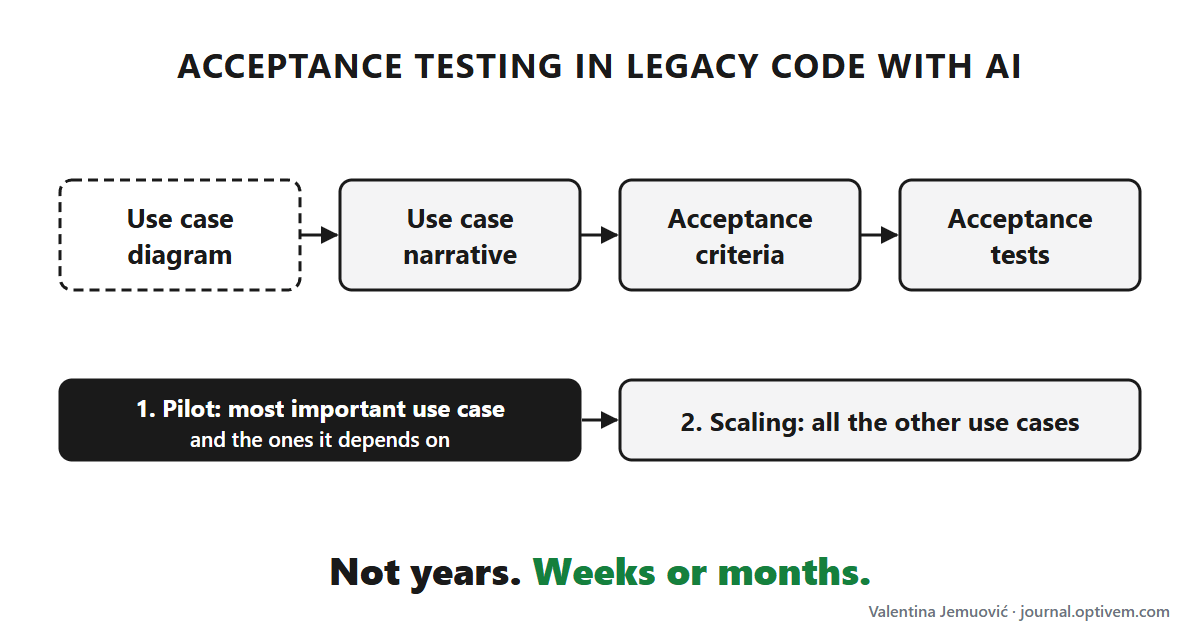
The new approach
Phase 0: the pipeline and the use case diagram
We need a pipeline with the commit stage, the acceptance stage and the release stage, so from day one we see the tests passing in the acceptance stage.
Then the use case diagram, including which use cases depend on each other. The AI writes it from the source code, the docs and the running system. We pick the most important use case.
Phase 1: the pilot
We start with the most important use case and the ones it depends on, in that order. For example, Place Order with a coupon needs a published coupon, so Publish Coupon goes first.
Use case narrative. The main scenario and the alternative scenarios. We review it with the domain experts.
Acceptance criteria. The use case scenarios, written as concrete examples with real values.
Acceptance tests, passing. Against the existing system, without changing it. Once the tests for the most important use case pass in the acceptance stage of the pipeline, we demo it to your team.
Phase 2: scaling
The pilot is where you learn the lessons if something goes wrong with AI. After the go-ahead, we repeat the same three steps for all the other use cases, one at a time, in the order they depend on each other.
To get that order, we use AI to build a dependency tree of the use cases. The tree sets the sequence: a use case only comes after the use cases it depends on.
This series is a work in progress. This list itself may be updated as I go through the writing of the series. The focus is primarily technical, but where I see it’s relevant, I might also include how to get buy-in from your team.
Where you end up
In a few weeks or a few months, instead of three to five years, you actually have protection. Then your team can keep working test-last, or move on to ATDD.
Ask me in the comments as you try to apply this in your real life project.
The discount
There’s a discount for the next 7 days: 20% off an annual subscription, until Tuesday, November 17.
This series is practical so you can apply it at work - you get AI prompts and code examples. You can ask me questions as you try to apply it at your job. This series is designed for busy software engineers who want to get results fast.
Using your training budget
You can expense it to your team’s training budget.
Here’s a sample email you can send your manager. Feel free to adapt it:
Hi [manager name],
We’re using AI to code faster, but every release still waits for manual regression testing. We need to solve that problem.
Optivem Journal has a new series on using AI to cover a legacy system with automated acceptance tests in weeks or months, not years. The tests run in the pipeline, so we can stop testing every release by hand. It includes the AI prompts and code examples, so I can try it on our real system at work. Paid subscribers can also ask questions and get support when they get stuck.
I’d like to expense an annual subscription from our training budget. It’s 20% off until Tuesday, November 17: https://journal.optivem.com/26d7c410
Thanks,
[your name]P.S. If it’s useful for the whole team, there’s also a group subscription, so we could all go through the series together.
You can get an invoice for your company from Substack (see how). To subscribe your whole team, click “Other payment options” when subscribing and choose “Group Subscription” (at least four people).