🔒 Hello, this is Valentina with a premium issue of the Optivem Journal. I help Engineering Leaders & Senior Software Developers cover legacy code with acceptance tests, using AI. This article is part of the Acceptance Testing in Legacy Code with AI series. To get these articles in your inbox every week, subscribe.
We have a legacy system with no acceptance tests, and we want to cover it using AI. In Minimal Pipeline & Use Case Diagram in Legacy Code with AI, we set up a minimal pipeline and mapped the system’s use cases. Now we want to start writing the acceptance tests.
Doing that for everything at once is risky. The tests would need the whole test architecture before even one could pass, and an architecture problem would show up at the very end. So we go use case by use case. The first one is our walking skeleton: once its acceptance tests run green in the pipeline, we know the acceptance test architecture works.
But before AI writes any test for this first use case:
Pick the core use case
List the use case dependencies
Interview the product owner about scenarios
Generate the use case narrative
Generate the business rules
Review with the product owner

The examples come from an online shop.
1. Pick the Core Use Case
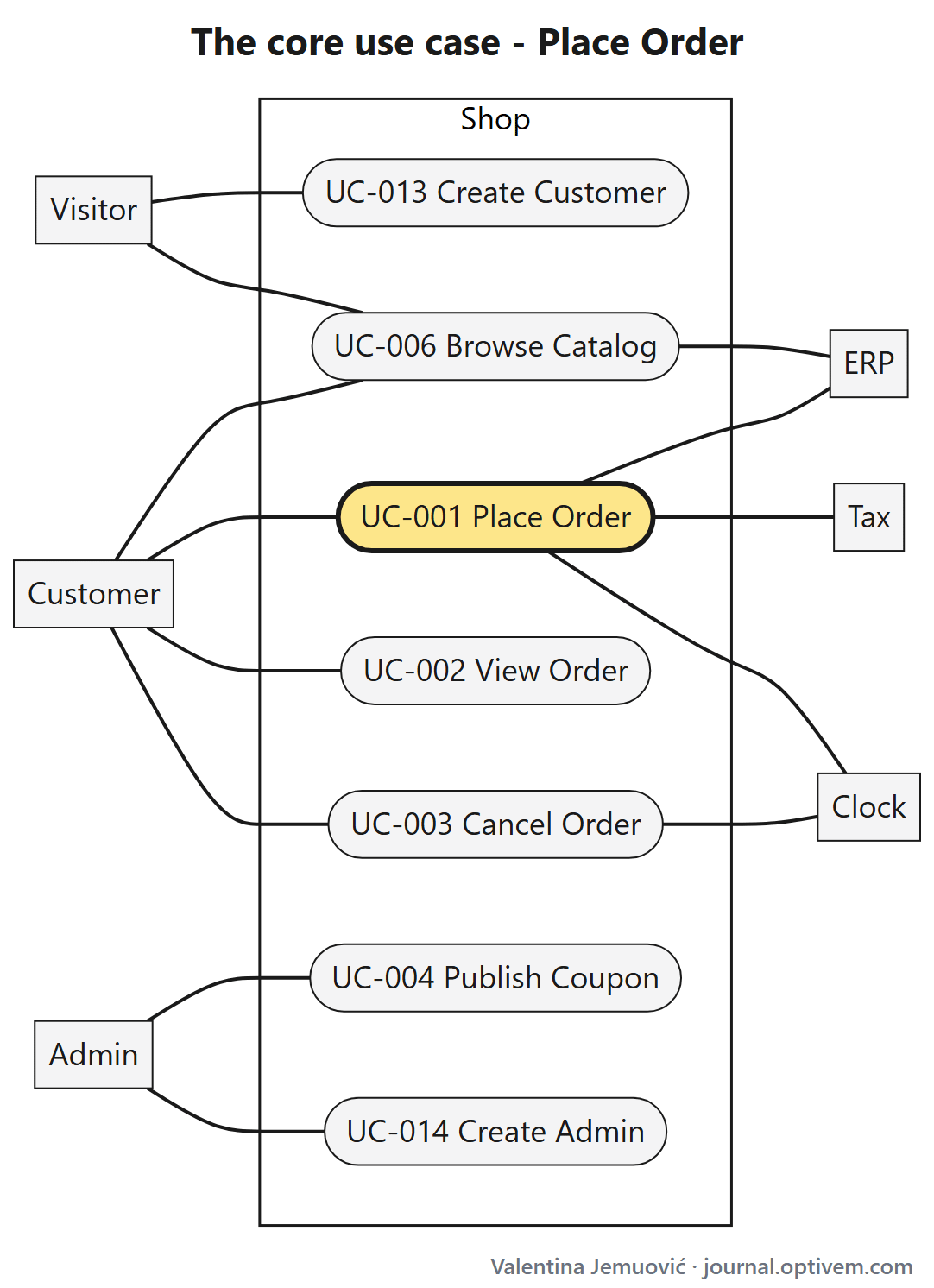
The core use case is the one the system exists for. Confirm it with the product owner: ask which use case on the diagram is the most business critical. It’s a subjective choice, so a human makes it, not AI.
In the shop: Place Order.
Note: Why not an easy one first? Covering the highest-value use case first gives the biggest payoff from the automation. And if you pick something easy, the team and management say “that doesn’t reflect how complex our system is”, so nobody buys in.
2. List the Use Case Dependencies
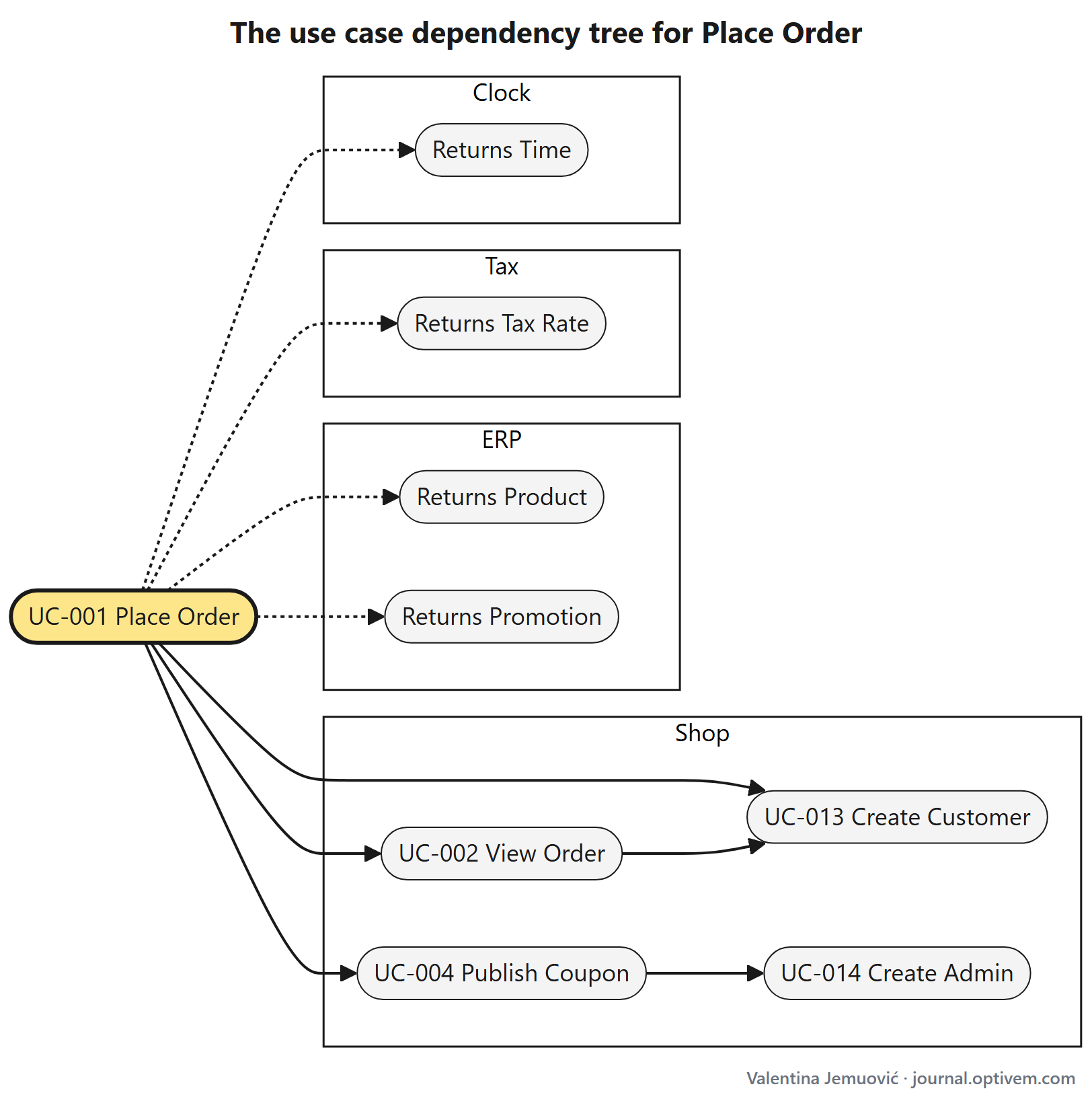
To execute Place Order, the system needs a product (and its promotion, if the ERP has one) and a coupon first. To check that the order was placed, we view the order. If the setup that creates the product is broken, the Place Order test fails for the wrong reason, and we look in the wrong place.
A Place Order test needs a product and a coupon, but nothing in the test says where the product comes from, or which use case creates the coupon. So we write the dependencies down.
AI prompt: For Place Order (UC-001), find what it depends on. Read the source code of Place Order.
Setup: for each piece of data Place Order reads, find the use case that creates it. That use case is either in our system (see
docs/use-cases/README.md) or in an external system.Verification: find which use cases show the result of Place Order to the user.
Dependencies of dependencies: do the same for each use case you found, and for theirs, until no new dependency turns up. When a use case leads back to one already listed, stop there.
Add a “Dependencies” section under the diagram in
docs/use-cases/README.md. For each use case, write two tables, one for the shop and one for the external systems: what it’s needed for, the dependency, and the source file where you found it. Name an external system dependency by what Place Order needs from it, like “ERP: Returns Product”.
The output from AI may look like this, in docs/use-cases/README.md:
## Dependencies

### UC-001 Place Order

Shop:

| Needed for | Dependency | Source file |
|---|---|---|
| Setup: a signed-in customer | UC-013 Create Customer | `shop-realm.json` |
| Setup: the coupon exists | UC-004 Publish Coupon | `CouponService.java` |
| Verification: the order was placed | UC-002 View Order | `OrderApiController.java` |

External systems:

| Needed for | Dependency | Source file |
|---|---|---|
| Setup: the product exists | ERP: Returns Product | `OrderService.java` |
| Setup: the promotion | ERP: Returns Promotion | `OrderService.java` |
| Setup: the country has a tax rate | Tax: Returns Tax Rate | `OrderService.java` |
| Setup: the current time | Clock: Returns Time | `OrderService.java` |

### UC-004 Publish Coupon

Shop:

| Needed for | Dependency | Source file |
|---|---|---|
| Setup: a signed-in admin | UC-014 Create Admin | `shop-realm.json` |

### UC-002 View Order

Shop:

| Needed for | Dependency | Source file |
|---|---|---|
| Setup: a signed-in customer | UC-013 Create Customer | `shop-realm.json` |
| Setup: the order exists | UC-001 Place Order | already listed |
The result is a use case dependency tree with Place Order at the root.